
Connect your sourcing platformto your enterprise stack.
How sourcing platforms integrate with ERP, CLM, S2P, ITSM, SSO/IdP, and data warehouses - and which patterns to use for each.
Course Overview
What you will learn.
Enterprise systems integration connects a sourcing platform to the rest of an organization's technology stack: ERP (SAP, Oracle), CLM, S2P, ITSM, SSO/IdP, and data warehouses. In procurement, integration matters because sourcing decisions create downstream data - purchase orders, contracts, and supplier records need to flow automatically into ERP and finance systems without manual re-entry.
Common Integration Points
Modern sourcing platforms don't operate in isolation. They integrate with multiple enterprise systems to enable end-to-end procurement workflows and ensure data consistency across your technology stack.
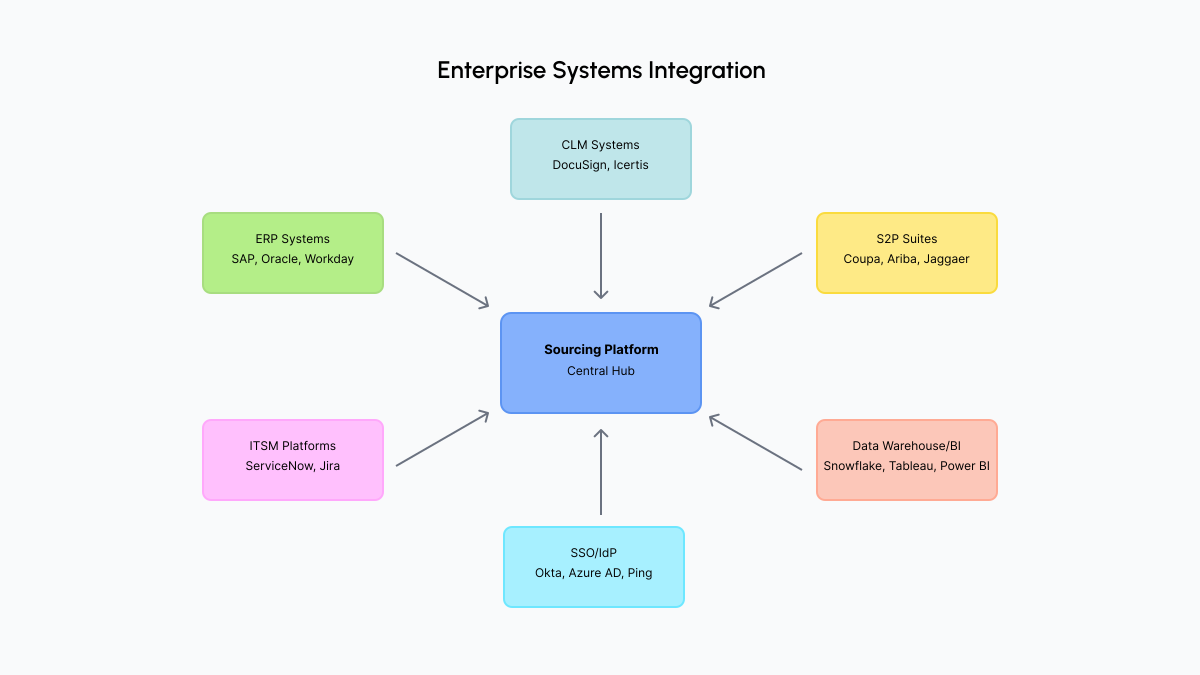
Figure 1: Enterprise systems integration architecture
What it enables
Integration for financial data, cost centers, budget validation, and purchase order creation.
Use cases
Budget checks before award, PO creation after contract, financial reporting, cost center validation
What it enables
Integration for contract storage, versioning, compliance monitoring, and renewal management.
Use cases
Contract storage after execution, version tracking, compliance alerts, renewal notifications
What it enables
Integration for purchase order creation, supplier master data, and invoice processing.
Use cases
PO creation, supplier data sync, catalog integration, invoice matching
What it enables
Integration for IT procurement intake and service catalog workflows.
Use cases
IT procurement requests, service catalog items, approval workflows, ticket creation
What it enables
Integration for single sign-on, user provisioning, and access management.
Use cases
User authentication, automatic provisioning, role assignment, access revocation
What it enables
Integration for reporting, analytics, and spend analysis across procurement data.
Use cases
Spend reporting, supplier performance analytics, category analysis, executive dashboards
Integration Priority
- SSO/IdPEssential for user experience and security. Users expect single sign-on.
- ERPCritical for budget validation and financial compliance. Prevents overspending.
- CLMImportant for contract lifecycle management and compliance tracking.
- S2PValuable for organizations with existing S2P investments; enables PO creation.
- ITSMUseful for IT-heavy organizations with service catalog requirements.
- Data Warehouse / BIImportant for analytics but can be implemented after core integrations.
Start with high-value integrations
Prioritize SSO and ERP first - they improve user experience and prevent financial errors. Then add CLM for contract management, followed by data warehouse integration for reporting. Phasing ensures core functionality works before adding value-added capabilities.
Integration Patterns
Three main integration patterns connect sourcing platforms with other systems. Each has specific use cases and trade-offs. Understanding when to use each is critical for effective integration design.
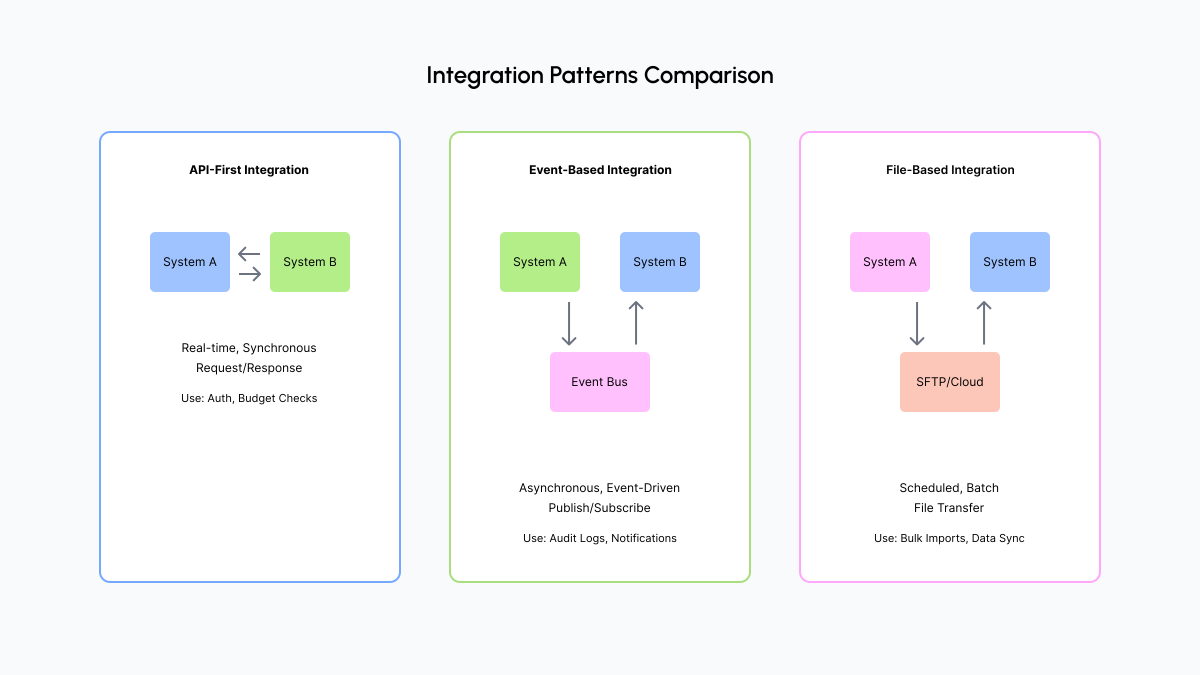
Figure 2: Integration patterns comparison
What it is
RESTful or GraphQL APIs for real-time, synchronous data exchange. Direct API calls between systems with immediate responses.
Best for
- User authentication and authorization
- Real-time budget checks
- Immediate contract updates
- Interactive workflows requiring instant feedback
Benefits
- Low latency - immediate responses
- High reliability - direct communication
- Real-time data consistency
- Standard protocols (REST, GraphQL)
What it is
Message queues or event streams for asynchronous communication. Systems publish events that other systems consume.
Best for
- Audit log replication
- Notification systems
- Data synchronization across systems
- High-volume, non-critical updates
Benefits
- Handles high volume efficiently
- Loose coupling - systems don't need to be simultaneously available
- Scalable - handles bursts
- Resilient - messages can be retried
What it is
Scheduled file transfers (CSV, XML, JSON) via SFTP or cloud storage. Systems exchange data files on a regular schedule.
Best for
- Bulk data imports
- Supplier master data sync
- Periodic reporting
- Legacy system integration
Benefits
- Simple to implement
- Works with legacy systems that lack APIs
- Batch processing efficiency
- No real-time dependency
Most platforms use a combination
Use API for real-time operations (SSO, budget checks), events for notifications and audit logs (high volume, async), and files for bulk data like supplier master sync (periodic, not time-sensitive). Choose the pattern that matches your latency and volume requirements.
Ready to test what you've learned? Take the Enterprise Systems Integration quiz to assess your knowledge of how sourcing platforms integrate with ERP, CLM, S2P, ITSM, SSO/IdP, and data warehouses.
See Nvelop's Integration Capabilities
Nvelop connects to your existing enterprise stack with pre-built integrations for ERP, CLM, SSO, and more - no custom development required.