
Technical Architecture for Modern Sourcing
Learn identity management, data models, security, and deployment options for sourcing platforms. For procurement and IT professionals.
What is Technical Architecture for Sourcing?
Technical architecture for sourcing encompasses the identity management, data models, security protocols, integration patterns, and deployment infrastructure that underpin modern sourcing platforms. It ensures scalability, compliance, and seamless interoperability with enterprise systems.
Duration
45-60 minutes
Level
Advanced
Lessons
7 lessons
What you'll learn:
- Identity and access management (SSO, SCIM, RBAC)
- Data model design and integration requirements
- Audit logging principles and compliance
- Security and compliance requirements
- Extensibility and customization options
- Deployment models and non-functional requirements
- Purchase to Pay (P2P) architecture and system integration
Purchase to Pay Architecture
Purchase to Pay (P2P) is the complete end-to-end process from identifying a need through sourcing, contracting, purchasing, receiving, invoicing, and payment. Understanding the P2P architecture helps you design integrated systems that support the entire procurement lifecycle efficiently.
Modern P2P architectures connect multiple systems to enable seamless workflows. Sourcing platforms handle the "source to contract" portion, while ERP and S2P systems manage purchase orders, goods receipt, invoicing, and payment. Integration between these systems ensures data consistency, process automation, and compliance.
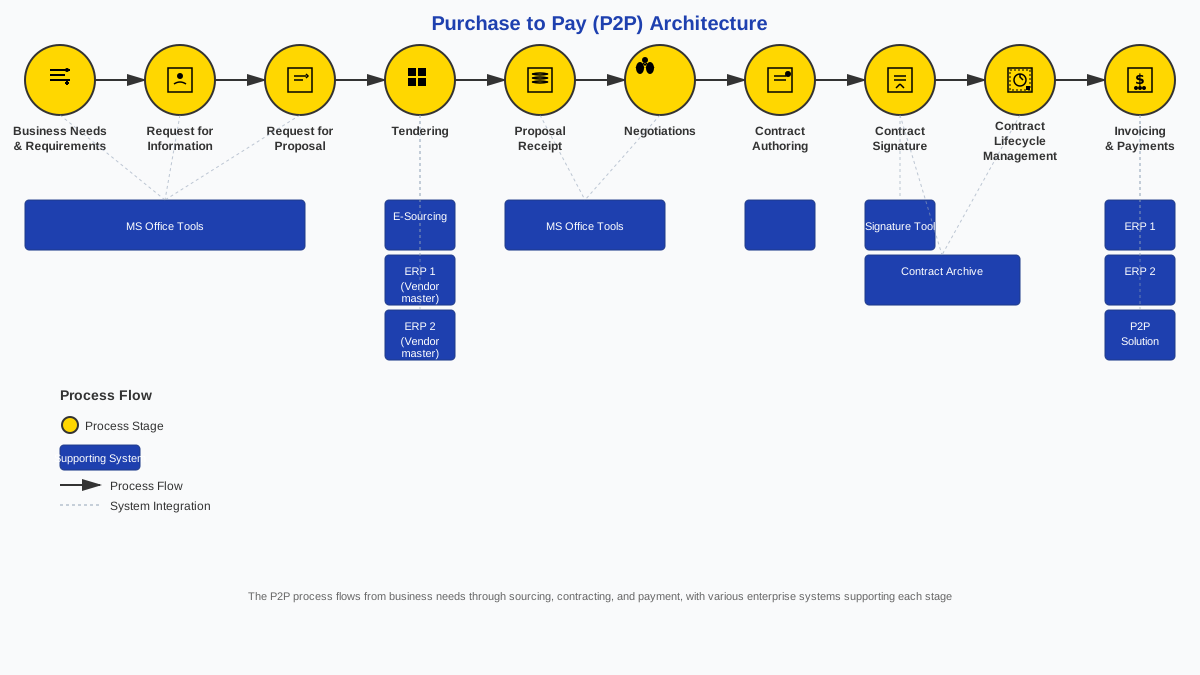
Figure 1: Purchase to Pay architecture and system integration
Key Components of P2P Architecture
Sourcing Platform
Handles source-to-contract processes including requirements definition, RFX creation, supplier evaluation, award decisions, and contract management. Integrates with ERP for budget validation and with CLM for contract storage.
ERP System
Manages financial data, cost centers, budgets, and general ledger. Validates budgets before awards, creates purchase orders after contracts, and processes financial transactions.
S2P Suite
Handles purchase order management, goods receipt, invoice processing, three-way match, and payment execution. Manages supplier master data and buying channels (catalog, spot buy, guided buying).
CLM System
Stores executed contracts, manages contract versions, monitors compliance, and tracks renewals. Receives contracts from sourcing platform after execution.
P2P Data Flow
Typical P2P Flow:
- Requirements & Sourcing: Sourcing platform manages requirements, RFX, evaluation, and award
- Budget Validation: Sourcing platform checks budget with ERP before award
- Contract Execution: Contract created in sourcing platform, stored in CLM
- Purchase Order: PO created in S2P or ERP, referencing contract terms
- Goods Receipt: Goods/services received, receipt recorded in S2P
- Invoice Processing: Supplier submits invoice, three-way match performed
- Payment: Payment processed and reconciled in ERP/payment systems
- Reporting: Data flows to data warehouse for analytics and reporting
Pro tip: Effective P2P architecture requires seamless integration between systems. API-based integrations enable real-time data exchange, while event-based patterns handle high-volume updates. Ensure data consistency across systems through proper integration design and master data management.
Identity and Access Management
Modern sourcing platforms should integrate with your identity provider for seamless access control. This ensures users have the right access without manual user management and improves security.
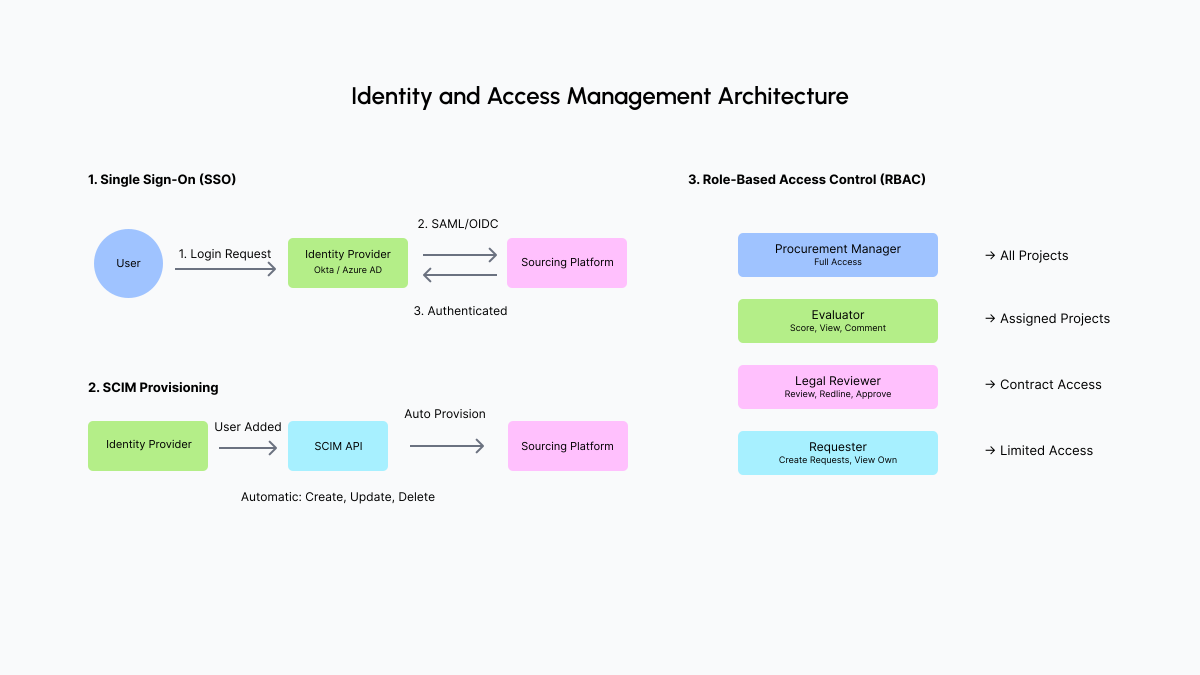
Figure 2: Identity and access management architecture
Single Sign-On (SSO)
SAML and OIDC
Industry-standard protocols for single sign-on. Users authenticate once with your identity provider and access multiple systems without re-entering credentials.
SAML (Security Assertion Markup Language): XML-based protocol, widely adopted, good for enterprise SSO.
OIDC (OpenID Connect): Modern, JSON-based protocol built on OAuth 2.0. Simpler than SAML, better for modern applications.
Example: User logs into Okta, clicks sourcing platform link, automatically authenticated. No separate password needed. If user is deactivated in Okta, access is immediately revoked.
SCIM Provisioning
Automatic User Management
SCIM (System for Cross-domain Identity Management) enables automatic user provisioning and deprovisioning. When users are added or removed in your IdP, the sourcing platform updates automatically.
Provisioning: New user added in IdP → automatically created in sourcing platform with appropriate roles.
Deprovisioning: User removed in IdP → automatically deactivated in sourcing platform.
Updates: User role changed in IdP → automatically updated in sourcing platform.
Role-Based Access Control (RBAC)
Permission Management
Permissions based on roles rather than individual users. Supports fine-grained access to projects, documents, and functions.
Common Roles
- Procurement Manager: Create projects, manage suppliers, view all data
- Evaluator: Score proposals, view assigned projects, add comments
- Legal Reviewer: Review contracts, redline documents, approve terms
- Finance: View budgets, approve spending, access financial reports
- Requester: Create requests, view own projects, limited access
Common mistake: Not implementing SSO or using manual user management. This creates security risks, user frustration, and administrative overhead. SSO should be a requirement for any enterprise deployment.
Pro tip: Ensure RBAC supports both role-based and project-based permissions. Users may need different access levels for different projects. For example, a user might be an evaluator on one project but only a viewer on another.
Data Model Basics
Understanding core data entities helps with integration design and reporting requirements. A well-designed data model supports both operational workflows and analytical needs.
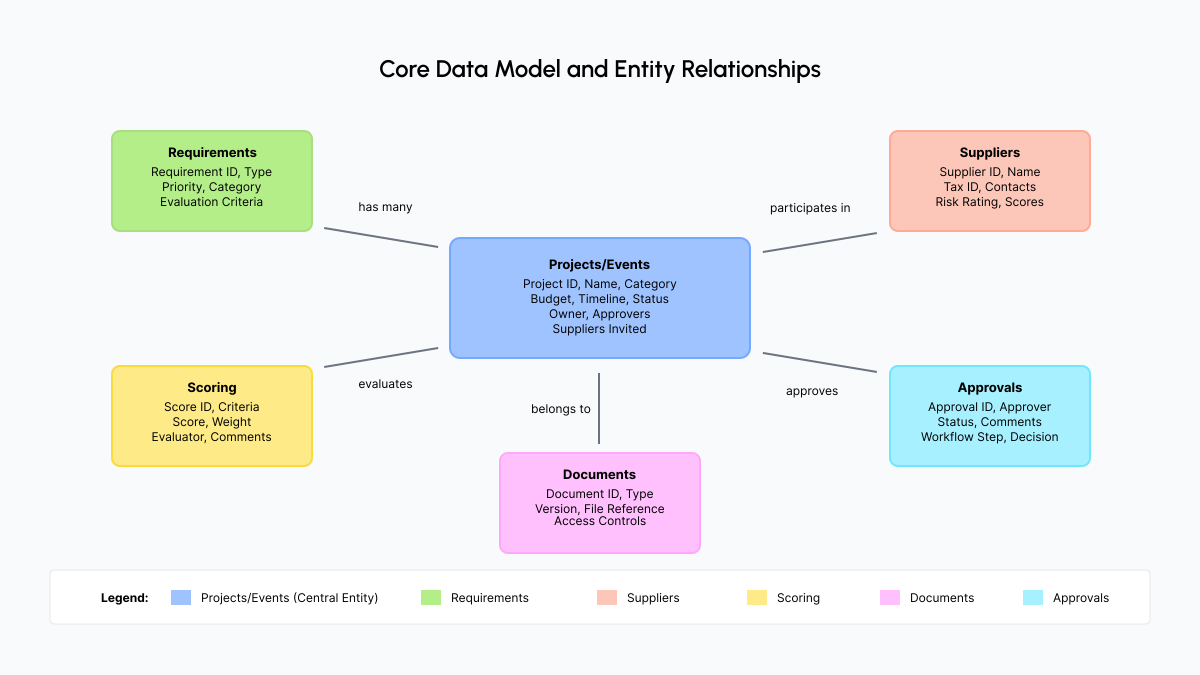
Figure 3: Core data model and entity relationships
Core Data Entities
Projects/Events
Sourcing projects or events (RFP, RFQ, etc.) with metadata like category, budget, timeline, status, owner, and stakeholders.
Requirements
Structured requirements with types (functional, non-functional, technical, business), priorities (must-have, nice-to-have), and traceability to evaluation criteria.
Suppliers
Supplier master data including company info, capabilities, compliance status, performance history, and relationship data.
Scoring
Evaluation scores, criteria, weights, evaluator assignments, comments, and scoring history. Links to requirements and suppliers.
Documents
RFX documents, supplier responses, contracts, attachments with versioning, metadata, and access controls.
Approvals
Approval workflows, approver assignments, status, comments, and audit trail. Links to projects, documents, and decisions.
Data Relationships
Understanding how entities relate helps with integration and reporting:
- Projects have many: Requirements, suppliers, documents, scores, approvals
- Suppliers participate in many: Projects, evaluations, contracts
- Requirements link to: Evaluation criteria, scoring, documents
- Documents belong to: Projects, suppliers, or both
- Approvals relate to: Projects, documents, or decisions
Pro tip: Ensure the data model supports both operational needs (workflow execution) and analytical needs (reporting, analytics). Consider denormalization for performance in reporting scenarios.
Audit Logging Principles
Comprehensive audit logs are essential for compliance and governance. Every significant action should be logged to create a complete record of who did what, when, and why.
What to Log
Who
User identity (username, email, user ID) and role. Essential for accountability and compliance.
What
Action performed (e.g., "Updated evaluation score", "Published RFP", "Approved contract"). Use clear, descriptive action names.
When
Timestamp with timezone. Use UTC for consistency, display in user's timezone. Include millisecond precision for high-volume systems.
Why
Context or reason (optional but valuable). User comments, system triggers, or business justification.
What Changed
Before and after values for modifications. Enables audit trail reconstruction and change analysis.
Audit Log Examples
2024-01-15 14:23:45.123 UTC
User: john.doe@company.com (Procurement Manager)
Action: Published RFP
Entity: Project ID: PRJ-2024-001
Details: RFP "Enterprise Software Selection" published to 5 suppliers
2024-01-16 09:12:33.456 UTC
User: jane.smith@company.com (Evaluator)
Action: Updated evaluation score
Entity: Score ID: SCR-001, Project: PRJ-2024-001
Details: Criteria: "Technical Capability", Score changed from 7 to 8, Comment: "Reviewed additional documentation"
Audit Log Best Practices
- Immutable logs: Audit logs should be write-only. Once written, they cannot be modified or deleted (except per retention policy).
- Separate storage: Store audit logs separately from operational data. This protects logs even if operational data is compromised.
- Retention policies: Define retention based on regulatory requirements. Some regulations require 7+ years of audit logs.
- Searchable: Logs should be searchable by user, action, entity, date range, and other relevant filters.
- Exportable: Support export for compliance reviews and investigations.
- Performance: Logging should not significantly impact system performance. Use asynchronous logging where possible.
Pro tip: Consider using event-based integration to replicate audit logs to a separate data warehouse. This provides redundancy, enables advanced analytics, and supports long-term retention without impacting operational performance.
Security and Compliance
Sourcing platforms handle sensitive procurement data including financial information, supplier details, and strategic plans. Security and compliance are non-negotiable requirements for enterprise deployments.
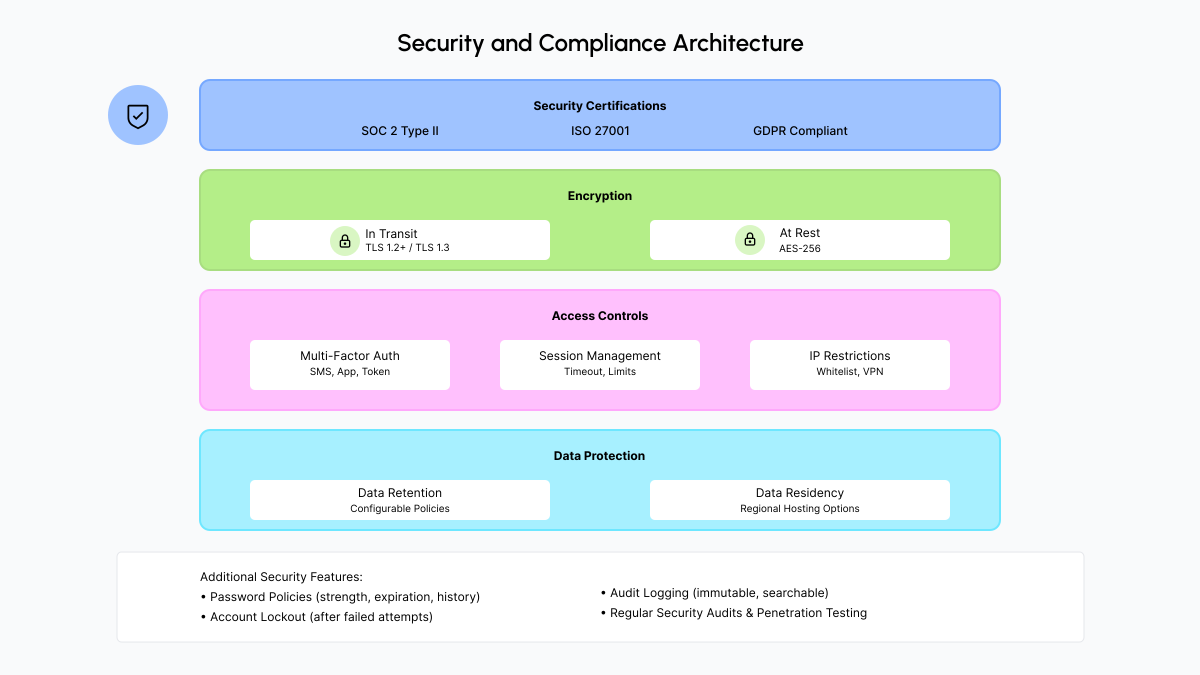
Figure 4: Security and compliance architecture
Security Certifications
SOC 2 Type II
Service Organization Control 2 Type II certification demonstrates controls over security, availability, processing integrity, confidentiality, and privacy. Annual audit required.
ISO 27001
International standard for information security management systems. Demonstrates systematic approach to managing sensitive information.
Other Certifications
Depending on industry: HIPAA (healthcare), PCI DSS (payment processing), FedRAMP (government), GDPR compliance (EU data protection).
Encryption
Encryption in Transit
Data encrypted while being transmitted over networks. Use TLS 1.2 or higher (TLS 1.3 preferred). All API calls, web traffic, and file transfers should use encryption.
Encryption at Rest
Data encrypted when stored on disk or in databases. Use AES-256 or equivalent. Encryption keys should be managed securely (key management service, hardware security modules).
Access Controls
- Multi-factor authentication (MFA): Require additional verification beyond password (SMS, authenticator app, hardware token). Essential for sensitive data access.
- Session management: Secure session handling, timeout policies, concurrent session limits, session invalidation on logout.
- IP restrictions: Option to restrict access to specific IP addresses or ranges. Useful for high-security environments.
- Password policies: Strong password requirements, password expiration, password history, account lockout after failed attempts.
Data Retention and Residency
Data Retention
Configurable retention policies aligned with legal and regulatory requirements. Some data may need to be retained for 7+ years. Support for data deletion per retention policies.
Data Residency
Options for regional data hosting to meet compliance needs (GDPR, data sovereignty laws). EU data in EU region, US data in US region, etc. Consider latency implications for global teams.
Common mistake: Not verifying security certifications or assuming all platforms meet enterprise security requirements. Always request current SOC 2 or ISO 27001 reports and review security documentation before deployment.
Pro tip: Security is not just about technology. Ensure the vendor has strong security practices: regular security audits, penetration testing, incident response procedures, and security training for staff.
Extensibility Concepts
Modern platforms should support customization and integration without requiring code changes to the core system. Extensibility enables organizations to adapt the platform to their specific needs.
Webhooks
Outbound Notifications
Webhooks send outbound notifications when events occur in the platform. Your systems can subscribe to events and react accordingly.
Common events: RFP published, evaluation completed, contract signed, approval required, supplier added
Use cases: Trigger workflows in other systems, send notifications, update dashboards, sync data
Implementation: Configure webhook URLs, select events, handle retries and failures
Example: When an RFP is published, a webhook notifies your notification system to send emails to stakeholders. When evaluation is completed, a webhook triggers contract creation in your CLM system.
SDK and API
Programmatic Access
Software Development Kit (SDK) and Application Programming Interface (API) provide programmatic access for custom integrations and automation.
REST API: Standard HTTP-based API for CRUD operations. Well-documented, easy to integrate.
GraphQL API: Flexible query language for efficient data fetching. Request only needed data.
SDK: Pre-built libraries in common languages (Python, JavaScript, Java) that simplify API usage.
Use cases: Custom integrations, automation scripts, data synchronization, bulk operations
Custom Fields
Extend Data Models
Add organization-specific fields to core data entities without modifying the base system. Enables customization while maintaining upgrade compatibility.
Common custom fields: Internal project codes, cost center mappings, custom classifications, organization-specific metadata
Field types: Text, number, date, dropdown, checkbox, multi-select
Use cases: Capture organization-specific data, integrate with internal systems, support custom reporting
Workflow Configuration
Configure Without Coding
Configure approval workflows, status transitions, and business rules without writing code. Enables business users to adapt processes.
Approval workflows: Define approvers, conditions, escalation rules, parallel vs sequential approvals
Status transitions: Define valid state changes, required conditions, automatic transitions
Business rules: Conditional logic, data validation, automatic assignments, notifications
Pro tip: Evaluate extensibility options before selecting a platform. Organizations have unique needs, and extensibility ensures the platform can adapt as requirements evolve. Avoid platforms that require vendor changes for every customization.
Deployment and Non-Functional Requirements
Understanding deployment models and non-functional requirements helps with security, compliance, and performance planning. These factors significantly impact total cost of ownership and user experience.
Deployment Options
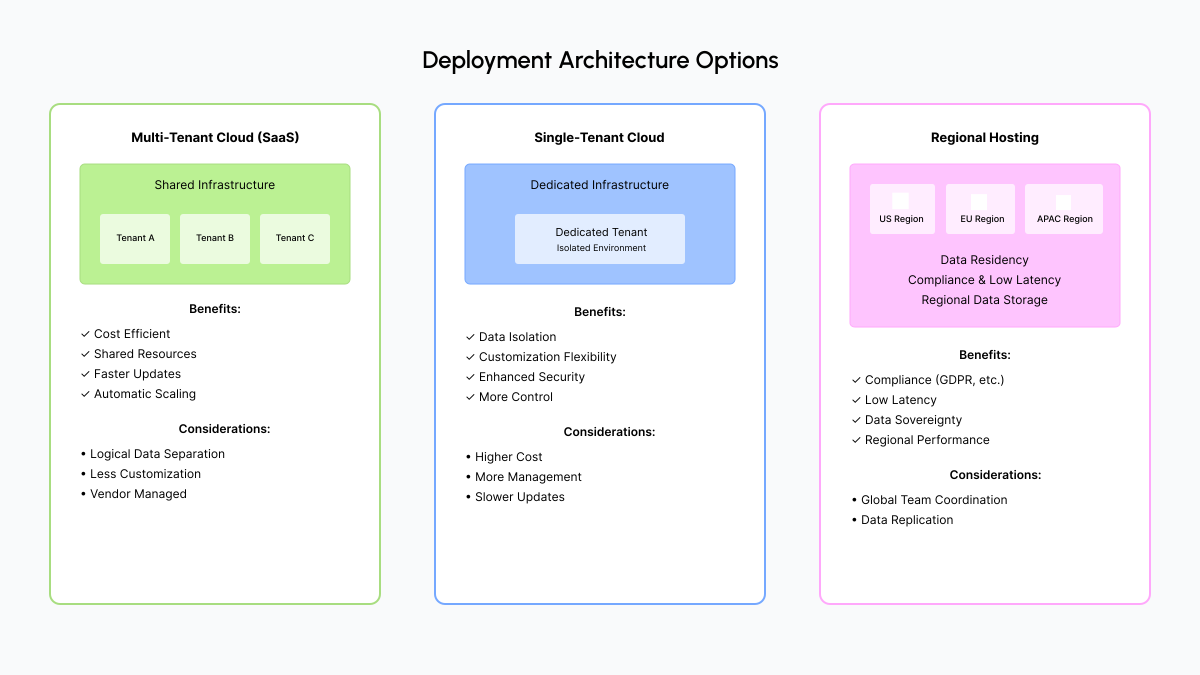
Figure 5: Deployment architecture options
Cloud (SaaS)
Software as a Service delivery model. Platform hosted and maintained by vendor, accessed via internet.
Considerations: Internet dependency, data residency, vendor lock-in, customization limitations
Single-Tenant vs Multi-Tenant
Single-Tenant
- Dedicated instance per customer
- Data isolation
- Customization flexibility
- Higher cost
- More control
Multi-Tenant
- Shared instance
- Cost efficient
- Faster updates
- Logical data separation
- Less customization
Regional Hosting
Data residency options for compliance (e.g., EU data in EU region). Consider latency implications for global teams. Some platforms offer multi-region deployment.
Non-Functional Requirements
Availability
Uptime SLAs (e.g., 99.9% = ~8.76 hours downtime/year). Consider maintenance windows, planned vs unplanned downtime, and SLA guarantees.
Performance
Response times for common operations (page loads, searches, document uploads). Consider peak load handling and geographic distribution.
Scalability
Ability to handle growth in users, projects, data volume. Consider horizontal scaling, database performance, and storage limits.
Disaster Recovery
RTO (Recovery Time Objective) and RPO (Recovery Point Objective). How quickly can the system recover, and how much data can be lost?
Backup and Recovery
Regular backups, backup retention, recovery procedures, and testing. Ensure backups are tested regularly.
Pro tip: Create a non-functional requirements checklist before vendor evaluation. Document your specific requirements for availability, performance, scalability, and disaster recovery. Use this to compare vendors and negotiate SLAs.
Test Your Knowledge
Ready to test what you've learned? Take the Technical Architecture quiz to assess your knowledge of enterprise integration, security, and technical requirements for sourcing platforms.
Course Complete
You've mastered technical architecture for modern sourcing platforms. Ready to explore other Academy modules or start applying these concepts?