
S2C ends at the contract.S2P goes all the way to payment.
Six lessons: buying channels, purchase orders, invoicing, three-way match, supplier onboarding, and payment.
Course Overview
What you will learn.
Source-to-Pay (S2P) is the complete procurement lifecycle that begins when a business identifies a sourcing need and ends when a supplier is paid. It covers strategic sourcing, contracting, purchase orders, goods receipt, invoice matching, and payment. S2P extends Source-to-Contract (S2C) by adding the operational buying and payment steps. Unlike Procure-to-Pay (P2P), S2P includes the upstream sourcing and supplier selection process, not just the buying and payment cycle.
S2P Lifecycle
S2C vs S2P
Full lifecycle
S2P vs P2P
Buying Channels
Catalog buying
Spot buy
Guided buying
Contract-based
Purchase Order Process
PO creation
Approval flow
PO types
Invoicing and Three-Way Match
Invoice processing
Three-way match
Exception handling
Supplier Onboarding
Master data
Onboarding process
Data quality
Payment and Reconciliation
Payment methods
Payment terms
Reconciliation
Lesson 01 of 06
S2P Lifecycle
Source to Pay extends Source to Contract by adding the transactional purchasing and payment cycle. S2C ends when the contract is signed. S2P continues through purchase orders, receipt, invoicing, and payment.
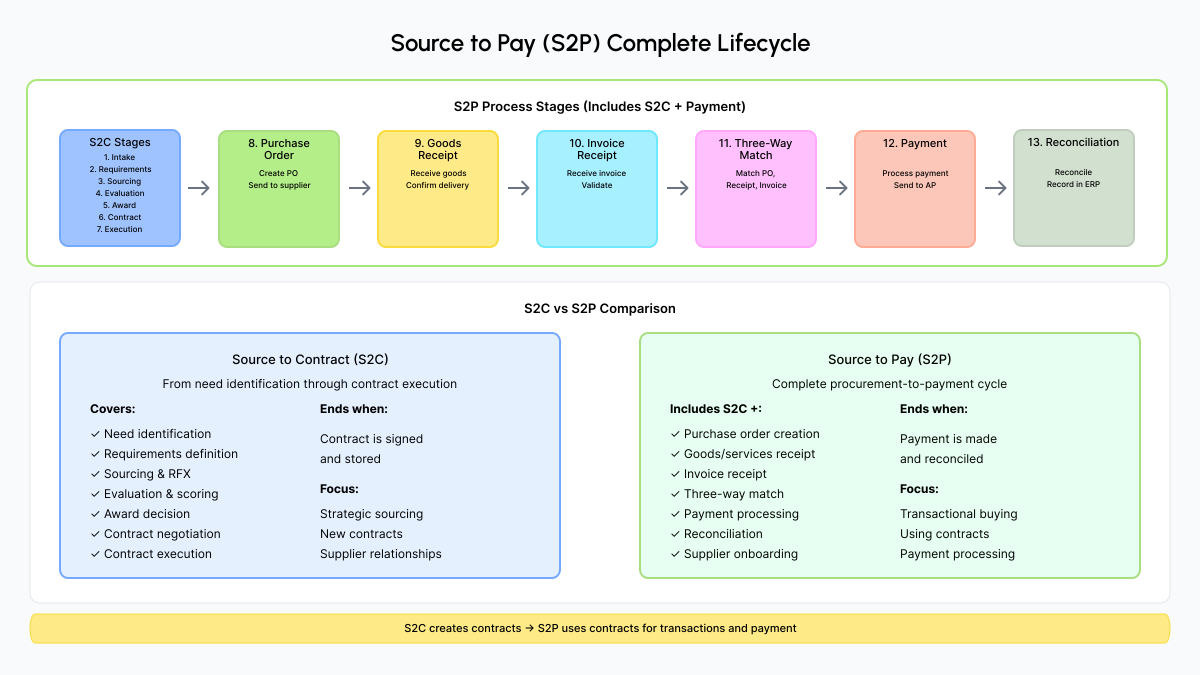
Figure 1: Source to Pay complete lifecycle
The Full S2P Flow
S2C → S2P handoff
Sourcing
S2C
RFX, evaluation, award decision
Contract
S2C
Negotiation, execution, storage
Onboarding
S2P
Supplier setup, master data creation
Purchase Order
S2P
Requisition, approval, PO sent to supplier
Receipt
S2P
Goods or services received and confirmed
Invoice
S2P
Supplier invoice received and validated
Match
S2P
Three-way match: PO, receipt, invoice
Payment
S2P
Payment approved and processed
S2C vs S2P vs P2P
Source to Contract (S2C)
Upstream only
Covers need identification through contract execution. Ends when the contract is signed and stored.
Source to Pay (S2P)
End to end
Includes all of S2C plus purchase orders, receipt, invoicing, three-way match, and payment.
Procure to Pay (P2P)
Downstream only
Starts after supplier selection. Covers requisition, PO, receipt, invoicing, and payment only.
Pro tip: Most organizations use S2C for strategic sourcing and new contracts, and S2P for transactional buying against existing contracts. The contract created in S2C becomes the foundation for all S2P transactions.
Lesson 02 of 06
Buying Channels
Buying channels are the different ways to procure goods and services. Each channel is suited for different types of purchases. Choosing the right channel improves both efficiency and compliance.
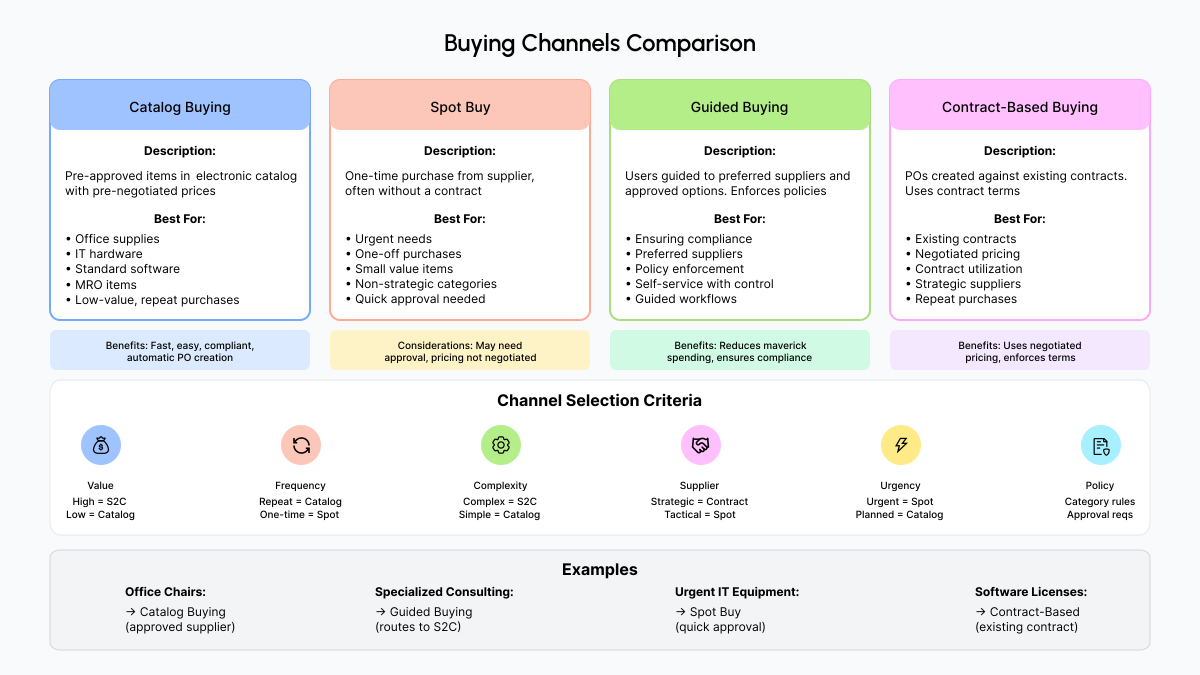
Figure 2: Buying channels and when to use each
The Four Buying Channels
Catalog Buying
Pre-approved items with pre-negotiated prices. Users browse and order directly. Automatic PO creation.
Best for: Office supplies, IT hardware, standard software, MRO items. Low-value repeat purchases.
Benefit: Fast, compliant, no negotiation needed.
Spot Buy
One-time purchase, often without a contract. May require quick approval and purchase order.
Best for: Urgent needs, one-off purchases, low-value items, non-strategic categories.
Benefit: Handles needs that fall outside existing contracts.
Guided Buying
Users are routed to preferred suppliers and approved options. System enforces policies automatically.
Best for: Ensuring compliance, directing to preferred suppliers, reducing maverick spending.
Benefit: Reduces non-compliant spend while maintaining self-service.
Contract-Based Buying
Purchase orders created against existing contracts. Uses pre-agreed terms, pricing, and conditions.
Best for: Purchases from suppliers with active contracts.
Benefit: Enforces negotiated pricing and tracks contract utilization.
Channel Selection Criteria
Value
High-value purchases may require S2C. Low-value items can use catalog or spot buy.
Frequency
Repeat purchases benefit from catalogs or contracts. One-time needs may use spot buy.
Complexity
Complex requirements need S2C. Simple, standard items can use catalogs.
Supplier relationship
Strategic suppliers have contracts. Tactical suppliers may use spot buy.
Urgency
Urgent needs may require spot buy or expedited processes.
Policy
Some categories require specific channels or approval thresholds.
Pro tip: Modern S2P platforms enable guided buying by automatically routing requests to the appropriate channel based on value, category, and policy rules. This ensures compliance while keeping the process fast for end users.
Lesson 03 of 06
Purchase Order Process
A purchase order (PO) is a formal document authorizing a supplier to deliver goods or services at specified prices and terms. It creates a legal commitment and is the foundation of the P2P cycle.
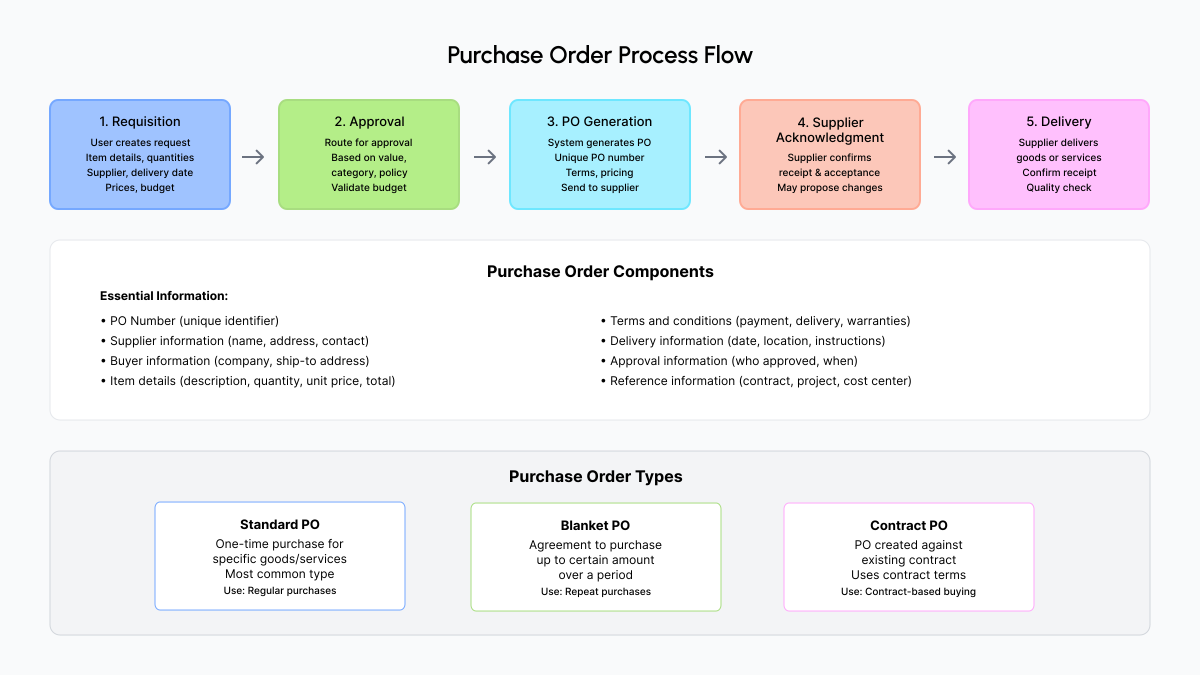
Figure 3: Purchase order process flow
PO Creation Steps
Requisition to delivery flow
Requisition
User creates PR with item details, quantity, price, and supplier
Approval
Routed for approval based on value, category, or policy
PO Generation
System generates PO with unique number and sends to supplier
Acknowledgment
Supplier confirms receipt and acceptance of the PO
Delivery
Supplier delivers. Receiving party confirms receipt and quality
PO Types
Standard PO
One-time purchase
A single purchase for specific goods or services. The most common PO type.
Blanket PO
Recurring spend
Agreement to purchase up to a set amount over a period. Individual releases created as needed.
Contract PO
Contracted supplier
PO created against an existing contract. Uses pre-agreed terms and pricing automatically.
What a PO Contains
PO number and date
Supplier and buyer details
Item descriptions and quantities
Unit prices and total amount
Delivery date and location
Payment terms and conditions
Approval details
Contract or cost center reference
Pro tip: Automate PO creation wherever possible. Catalog purchases, contract-based buying, and recurring purchases can generate POs automatically, reducing manual work and errors.
Lesson 04 of 06
Invoicing and Three-Way Match
After goods or services are received, suppliers send invoices. Three-way match is the process of verifying that the purchase order, goods receipt, and invoice all align before approving payment.
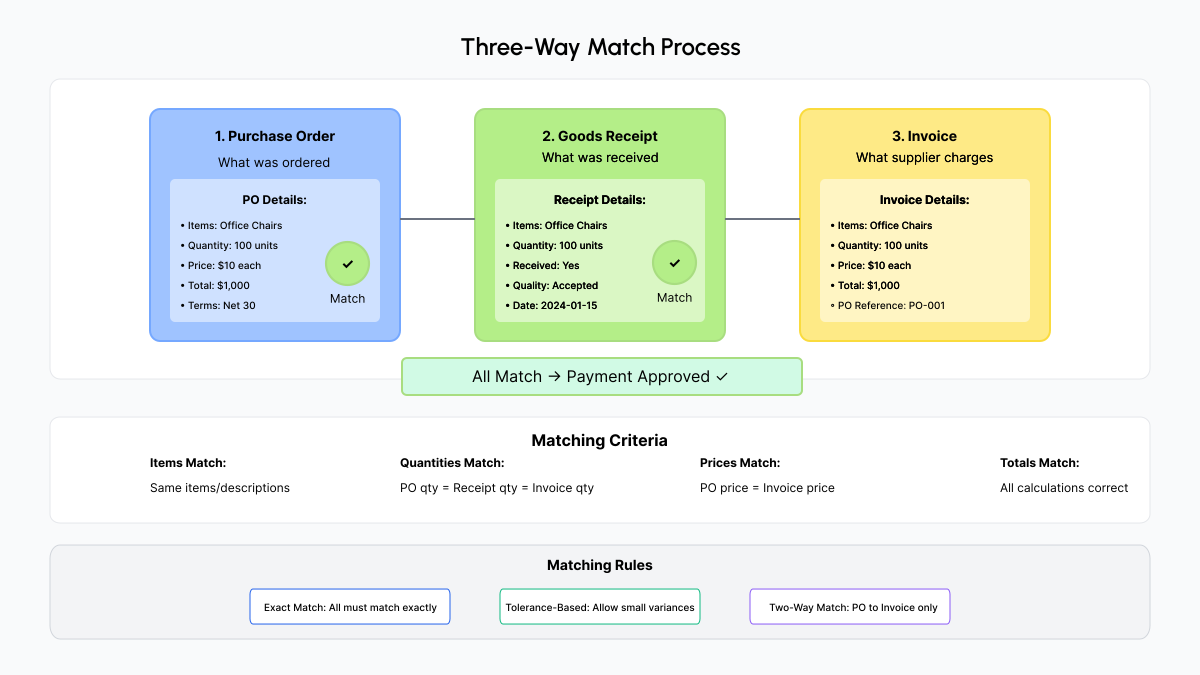
Figure 4: Three-way match process
The Three Documents
Purchase Order
What was ordered: items, quantities, prices, and agreed terms.
Goods Receipt
What was received: confirmation that goods or services were delivered and accepted.
Invoice
What the supplier is charging: items, quantities, prices, and total amount.
Invoice Processing Steps
Invoice receipt: Supplier sends invoice (paper or electronic). Invoice captured and entered into the system.
Invoice validation: Verify supplier, amounts, dates, PO reference, and tax calculations.
Matching: Match invoice to PO and goods receipt. Identify any discrepancies.
Exception handling: Resolve mismatches: price differences, quantity variances, missing receipts.
Approval: Route for approval if required based on value or exception type.
Payment: Generate payment, send to accounts payable, record in financial system.
Matching Rules
Exact match
All three documents must match exactly. Most secure but may generate more exceptions.
Tolerance-based match
Small differences within a tolerance (e.g., 1% price variance) are accepted automatically.
Two-way match
PO matched to invoice only, no goods receipt required. Used for services.
Common mistake: Approving invoices without proper matching. This leads to paying for goods not received, incorrect amounts, or duplicate payments. Always perform three-way match before payment approval.
Pro tip: Automate three-way match where possible. Modern systems match documents automatically and flag exceptions for human review. This speeds invoice processing and significantly reduces payment errors.
Lesson 05 of 06
Supplier Onboarding
Supplier master data is the foundation of every S2P transaction. It contains the information needed for purchase orders, invoicing, and payments. Supplier onboarding is the process of adding new suppliers to the system correctly.
Supplier Master Data
Basic Information
- Company name and legal name
- Tax ID or registration number
- Addresses: HQ, billing, shipping
- Contact information
Financial Information
- Bank account details
- Payment terms
- Currency preferences
- Tax information
Procurement Information
- Supplier categories
- Capabilities and certifications
- Performance ratings
- Preferred status
Compliance Information
- Insurance certificates
- Compliance certifications
- Risk ratings
- Due diligence status
Onboarding Process
Request to activation flow
Request
Business user requests new supplier with basic info and justification
Data Collection
Collect company details, tax info, bank details, compliance documents
Due Diligence
Verify legitimacy, financial stability, and compliance status
Approval
Route for approval based on risk, value, or category
Master Data
Create supplier record, assign number, set up payment terms
Activation
Activate for use. Supplier can now receive POs and be paid
Common Data Quality Issues
Poor master data causes real problems
Duplicate records for the same supplier
Incorrect bank details causing payment failures
Outdated addresses and contact information
Missing required tax IDs or compliance documents
Inconsistent terms across different systems
Pro tip: Centralize supplier master data in one system. A single source of truth for supplier information prevents duplicates and inconsistencies. Integration ensures data stays synchronized across ERP, S2P, and sourcing platforms.
Lesson 06 of 06
Payment and Reconciliation
After invoice approval, payment is processed and sent to the supplier. Reconciliation ensures payments match invoices and that financial records are accurate and complete.
Payment Methods
ACH / Wire Transfer
Most common B2B
Electronic bank transfer. Fast, secure, and cost-effective. The standard method for B2B payments.
Check
Declining use
Paper check. Slower and higher cost. Still accepted by some suppliers but declining in adoption.
Credit Card
Small purchases
For smaller purchases. Fast but may carry processing fees. Some suppliers do not accept cards.
P-Card
Employee spend
Corporate procurement card for employee purchases. Well-suited to low-value, frequent transactions.
Payment Process
Payment authorization: Approved invoice triggers authorization. Verify payment terms and due date.
Payment generation: Create payment file with supplier bank details, amount, and reference numbers.
Payment execution: Submit payment to bank or payment processor. Payment sent to supplier.
Payment confirmation: Receive bank confirmation. Update records to show payment made.
Reconciliation: Match payments to invoices, verify bank statements, resolve any discrepancies.
Common Payment Terms
Net 30
Payment due 30 days after invoice date. Most common standard term.
Net 60
Payment due 60 days after invoice date.
2/10 Net 30
2% discount if paid within 10 days, otherwise full amount due at 30 days.
Due on receipt
Payment due immediately upon invoice receipt.
Milestone-based
Payment due upon completion of agreed project milestones.
Advance payment
Payment made before delivery. Less common and carries higher risk.
Pro tip: Negotiate early payment discount terms (such as 2/10 Net 30) with key suppliers. If your cash position allows it, early payment discounts can generate significant savings. Automate the process so discounts are captured consistently.
FAQ
Frequently asked questions.
Common questions about Source to Pay processes, buying channels, and payment workflows.
Test Your Knowledge
Source to Pay Quiz
Ready to test what you have learned? Take the quiz to assess your understanding of S2P stages, buying channels, three-way match, and payment workflows across all six lessons.
Keep learning
Related Courses
Source-to-Contract (S2C)
Master every S2C stage: requirements, RFX, evaluation, award, and contract execution.
Procurement Fundamentals
What procurement is, how organizations structure it, and operating models explained.
Supplier Management
Segmentation, performance management, risk assessment, and SRM best practices.
Course complete.
You have covered the full Source to Pay lifecycle. Ready to go deeper on sourcing fundamentals or the contract side of procurement?